What we found (and didn't find) about controlling the dashboard's display language.
Last updated: 2026-09-09
🔧 Changing the Dashboard Language
1
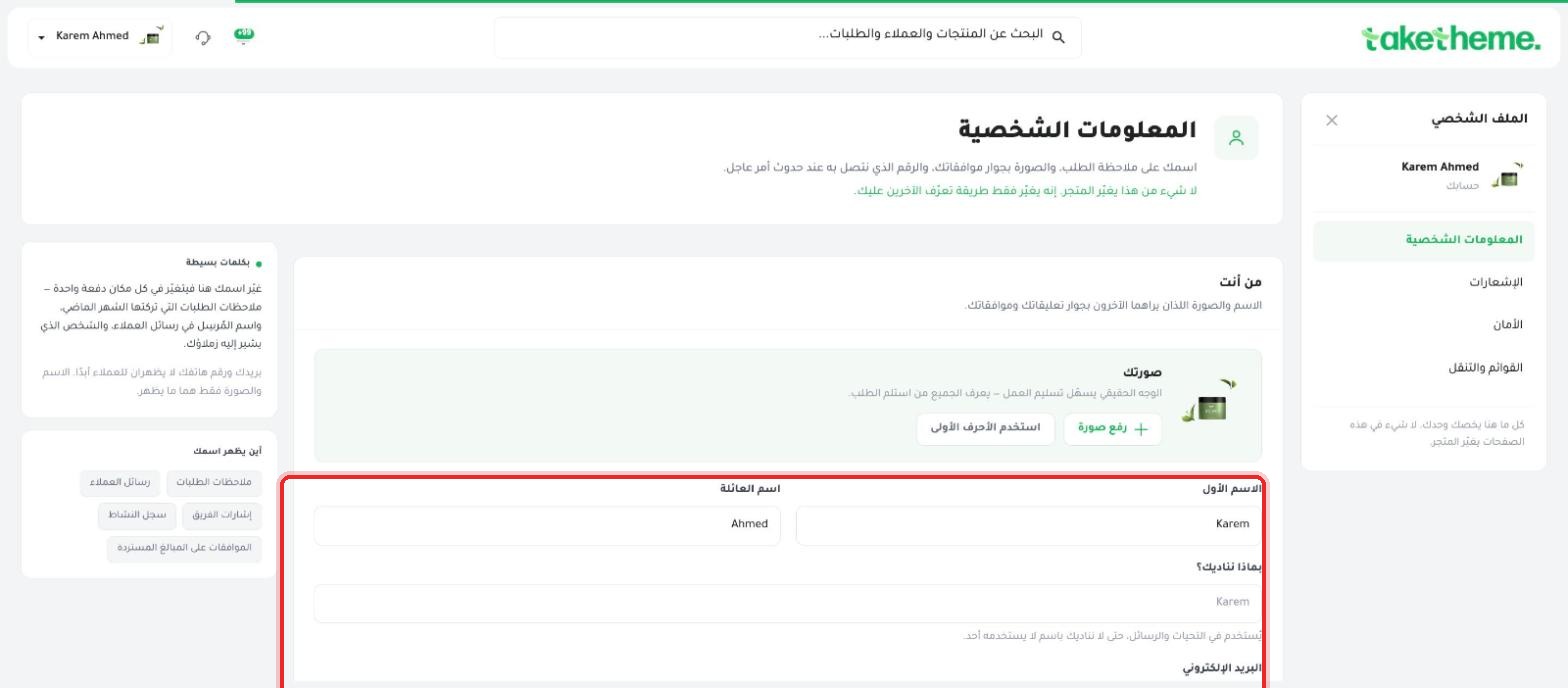
We reviewed the profile page (Personal Information and Security) and the store settings page (General) looking for an explicit language switcher inside the dashboard.
📍 Personal Information screen — no explicit language switcher present
⚠️ Disclosure note: We did not find an explicit button or dropdown titled "Language" within the account we tested — the entire dashboard was already fully in Arabic by default (except for the Theme Builder interface, which always appears in English, as we documented in the design articles).
2
The most likely explanation is that the dashboard's language is tied to the browser's language or an account setting at sign-up time, rather than a manual switcher inside the interface itself.
💡 If you need to run the dashboard in a language other than the default Arabic or English, try changing your browser's own language first, or otherwise contact TakeTheme support to check whether an account-level language setting exists.
❓ Frequently Asked Questions
Can team members see the dashboard in a different language than mine?
Since we didn't find a separate per-user language setting, the language is most likely uniform across the store or tied to each member's own browser — this wasn't tested directly.
Is the storefront (what the customer sees) language separate from the dashboard?
Yes, your storefront's language for customers is managed through the theme and content settings themselves (pages, products, menus), completely separately from your internal dashboard's language.