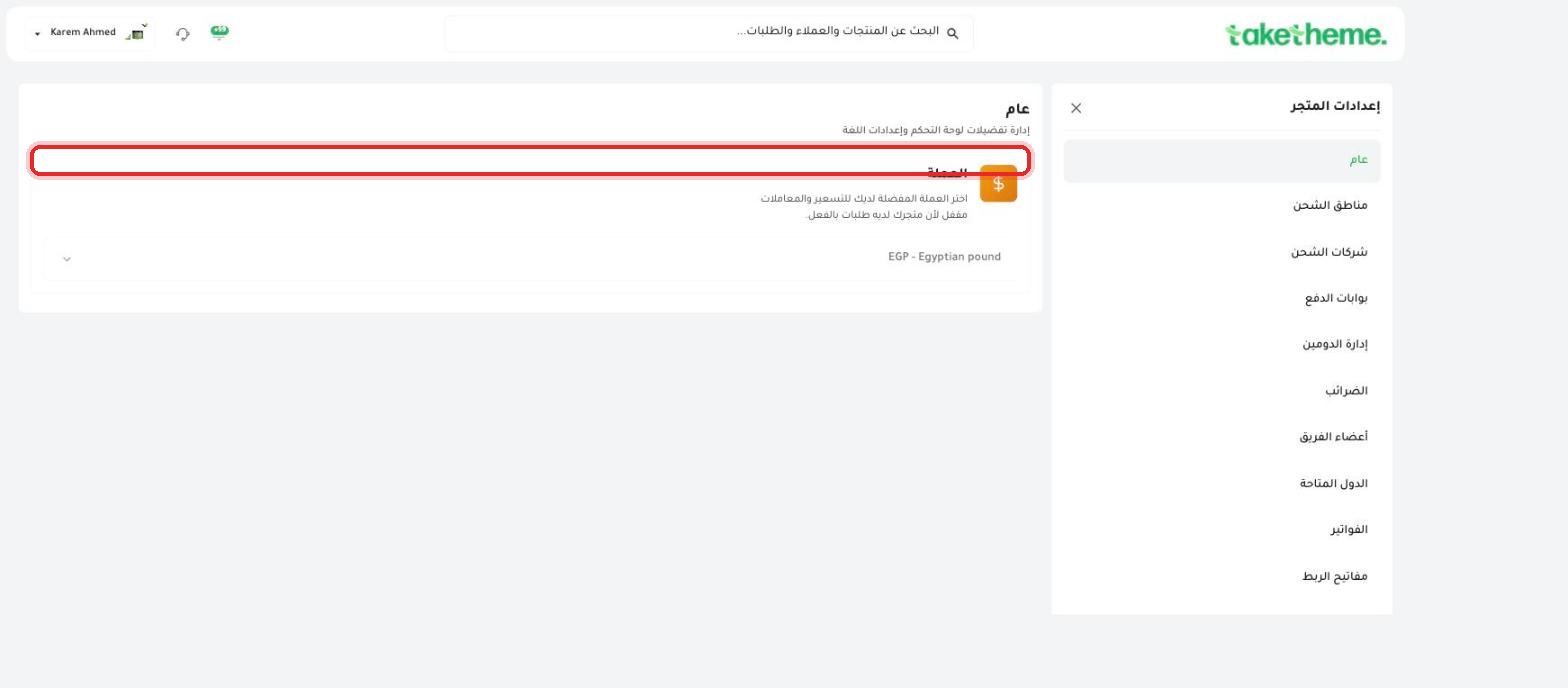
Choose your store's currency carefully — the field locks automatically as soon as your first order arrives.
Last updated: 2026-09-09
🔧 Setting Your Store's Base Currency
1
From the sidebar, open Store Settings, then choose General — the first and simplest tab in settings.
2
You'll find a single field titled Currency with the description: "Choose your preferred currency for pricing and transactions" — in the store we tested it was set to EGP - Egyptian pound.
📍 Currency field with a note (Locked because your store already has orders)
⚠️ Important disclosure note: The field appeared Locked with an explicit message: "Locked because your store already has orders." This means that as soon as your first real order arrives, your store's currency becomes fixed and you can no longer change it yourself from this screen.
3
If your store is still new and has no orders, the field should be editable — choose the right currency from the dropdown before your first sale, because the change is not directly available to you afterward.
💡 If you need to change the currency after you've started receiving orders, the only available route is to contact TakeTheme support directly — this isn't a self-serve process from the dashboard in that case.
❓ Frequently Asked Questions
Why does the currency lock after the first order?
Most likely to avoid any conflict in the pricing of past orders, financial reports, and invoices if the currency were suddenly changed after real sales data is already tied to the old currency.
Can I sell in multiple currencies to customers in different countries?
The field we saw sets a single base currency for the entire store — we did not verify whether there's support for automatically displaying prices in multiple currencies based on the customer's country.