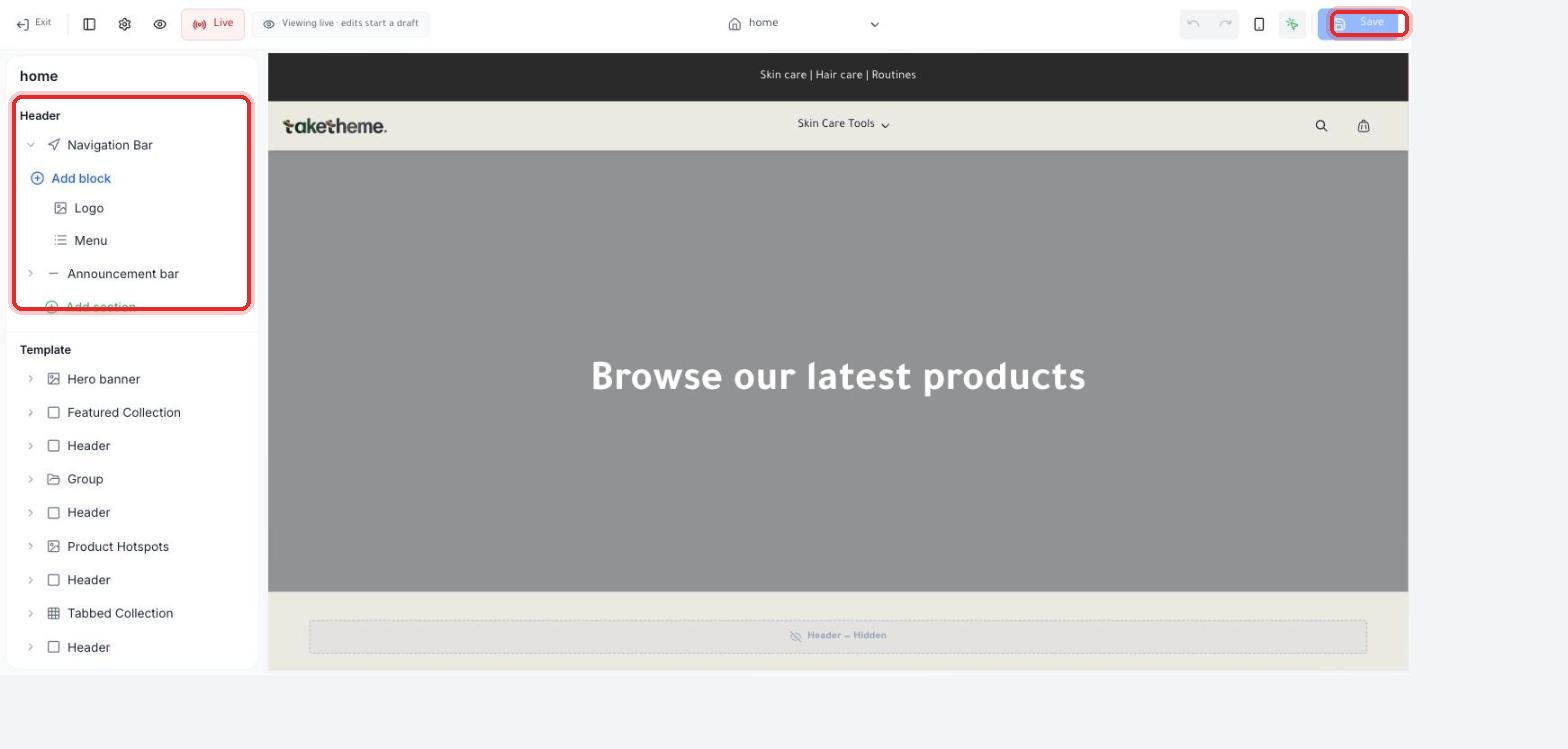
How to add and arrange sections and blocks on your store's pages from the theme editor.
Last updated: 2026-09-09
🔧 Adding a new section or block to the page
1
Open the Theme Builder from the Themes page, and in the layer tree on the left scroll down until you find the + Add section link at the spot where you want to add the new section (under the Header or between any two sections in the Template).
📍 (Add block) and (Add section) links in the layer tree, and the list of ready-made sections under Template
2
Click Add section to open a list of all the ready-made sections available in the theme — such as Hero banner, Product Hotspots, Tabbed Collection, and Group — pick the one that suits you.
3
To add a smaller element inside an existing section (like adding an item to the navigation menu), open the section from the layer tree, then click the + Add block link that appears inside it.
4
After adding the section or block, drag it up or down in the tree using the drag handle to change its position on the page — the live preview updates instantly.
💡 Each section shows an arrow (>) next to it to open its own properties — like images, text, and the number of products displayed — click it to edit that section's content after adding it.
❓ Frequently Asked Questions
Can I add the same section more than once on the same page?
Yes, you can add the same section type (like Featured Collection) more than once with different content each time.
How do I remove a section I don't need?
Open the section from the layer tree and you'll find a Delete option or a trash icon next to its name — or you can hide it temporarily instead of deleting it if you're not sure.
Can I add a custom section that isn't in the ready-made list?
The list we saw in the dashboard shows ready-made sections from the selected theme only — we haven't verified whether there's an option to build a fully custom section from scratch within this interface, so if you need a section that isn't in the ready-made list, contact TakeTheme support.