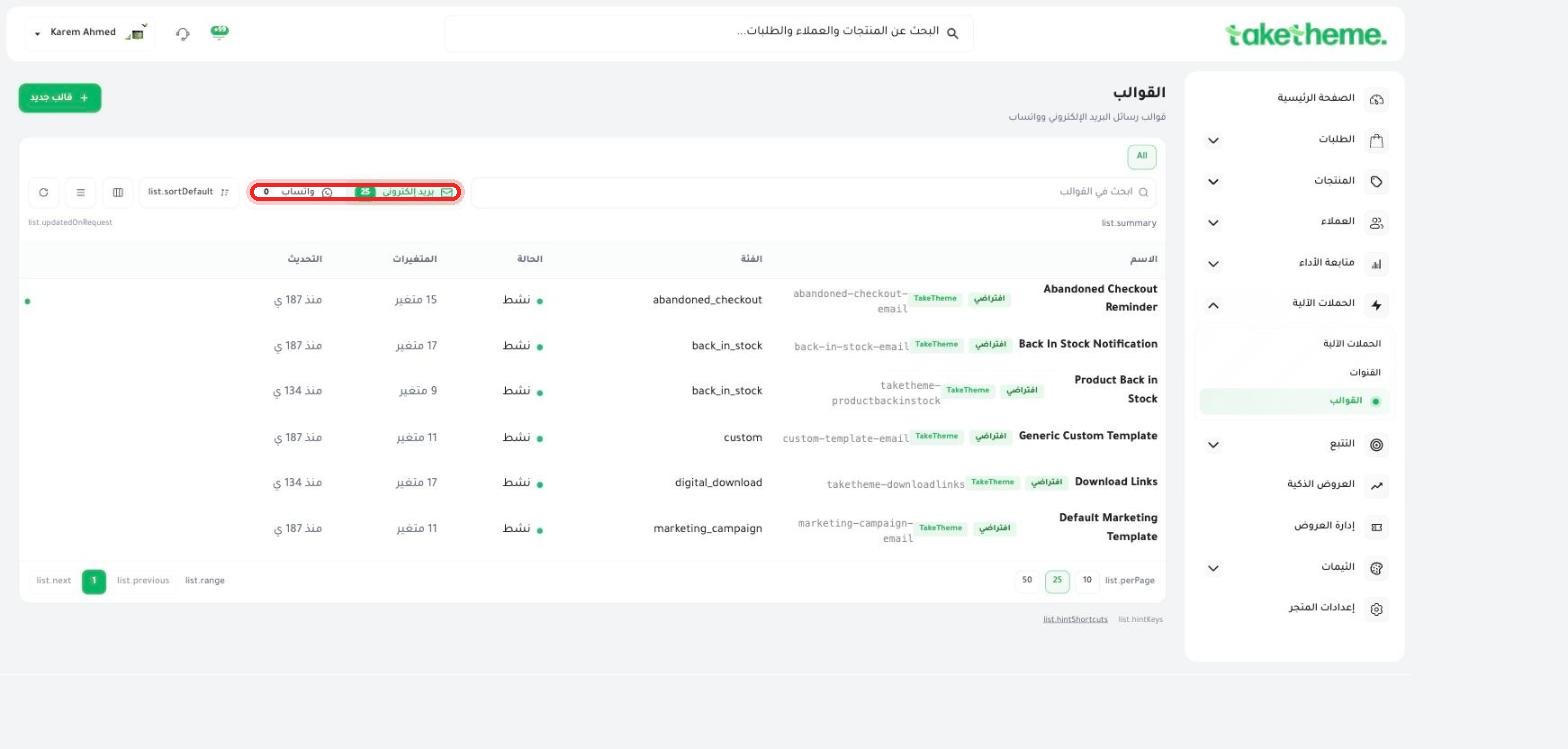
25 ready-made email templates for your automated campaigns.
Last updated: 2026-09-09
🔧 Ready-made automation templates
1
From Automated Campaigns → Templates, you'll find a library of ready-made templates spread across two tabs: Email (25 templates) and WhatsApp (0 templates currently in the test store).
📍 Templates page — 25 ready-made email templates, including Abandoned Checkout Reminder, Back In Stock Notification, and Default Marketing Template
2
Some of the most notable ready-made templates: Abandoned Checkout Reminder, Back In Stock Notification and Product Back in Stock, Download Links (for digital product download links), and Default Marketing Template (a general marketing template).
3
Click on any template to preview it and edit its text or design, or click + New template to create a template from scratch.
💡 These are the same templates automatically used in the ready-made automated campaigns (such as order confirmation or shipping notifications) — editing a template changes how the message that reaches your customer looks directly.
❓ Frequently Asked Questions
Why aren't there ready-made WhatsApp templates?
The test store had no WhatsApp templates created at the time of review (0 templates) — you can create a new WhatsApp template yourself from the same page using the "+ New template" button.
Does editing a template affect old campaigns sent with it?
No, the edit only applies to new messages after saving — messages already sent before that stay as they were.