Product Feed and Connecting It to Instagram and TikTok
Show your products automatically in Meta, TikTok, Snapchat, and Google Shopping ads.
Last updated: 2026-09-09
🔧 Product Feed
1
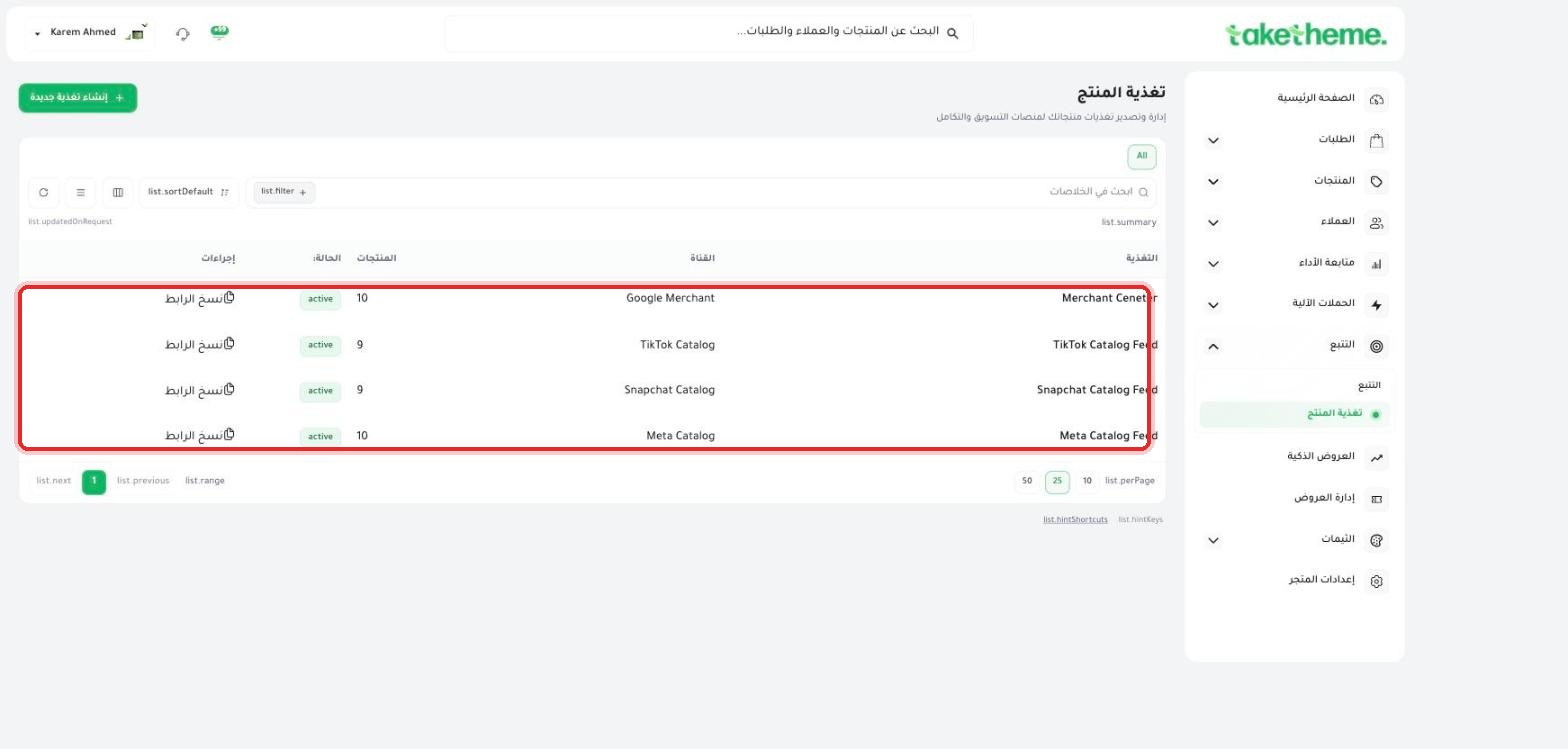
From Tracking → Product Feed, you'll find 4 ready and already active product feeds in the test store.
📍 Product Feed page — 4 ready feeds: Merchant Center, TikTok Catalog Feed, Snapchat Catalog Feed, and Meta Catalog Feed
Merchant Center (Google Merchant): to show your products in Google Shopping and Google Shopping ads.
Meta Catalog Feed: to show your products in Instagram and Facebook ads and shopping (Shops).
TikTok Catalog Feed: to show your products in TikTok Shopping ads.
Snapchat Catalog Feed: to show your products in Snapchat's dynamic ads.
2
Click Copy link next to the feed you need — you'll get a direct URL link to the feed file (in XML or CSV format depending on the platform).
3
Open the dashboard for the platform you need (Meta Commerce Manager, TikTok Catalog Manager, Google Merchant Center, or Snapchat Ads Catalog), and paste the feed link into the catalog setup (Data Feed URL).
4
The platform will schedule a periodic automatic refresh of the feed from the same link — any change to your prices or stock in TakeTheme will appear in the catalog after the next automatic update.
💡 We noticed in the test store that all four feeds were already active with a slightly different product count per platform (9-10 products) — meaning the feed is built automatically from your product catalog as soon as you publish them in TakeTheme.
❓ Frequently Asked Questions
Do I need to create the feed manually?
No, the four feeds are automatically ready in the TakeTheme dashboard — all you need to do is copy their link and paste it into each ad platform's dashboard.
Why is the product count different between feeds?
Some platforms have different eligibility requirements for products (such as having an image, description, or a valid price), so a particular product may meet one platform's requirements but not another's.