Approve or reject customer reviews before they appear on your store.
Last updated: 2026-09-09
🔧 Steps to manage product reviews
1
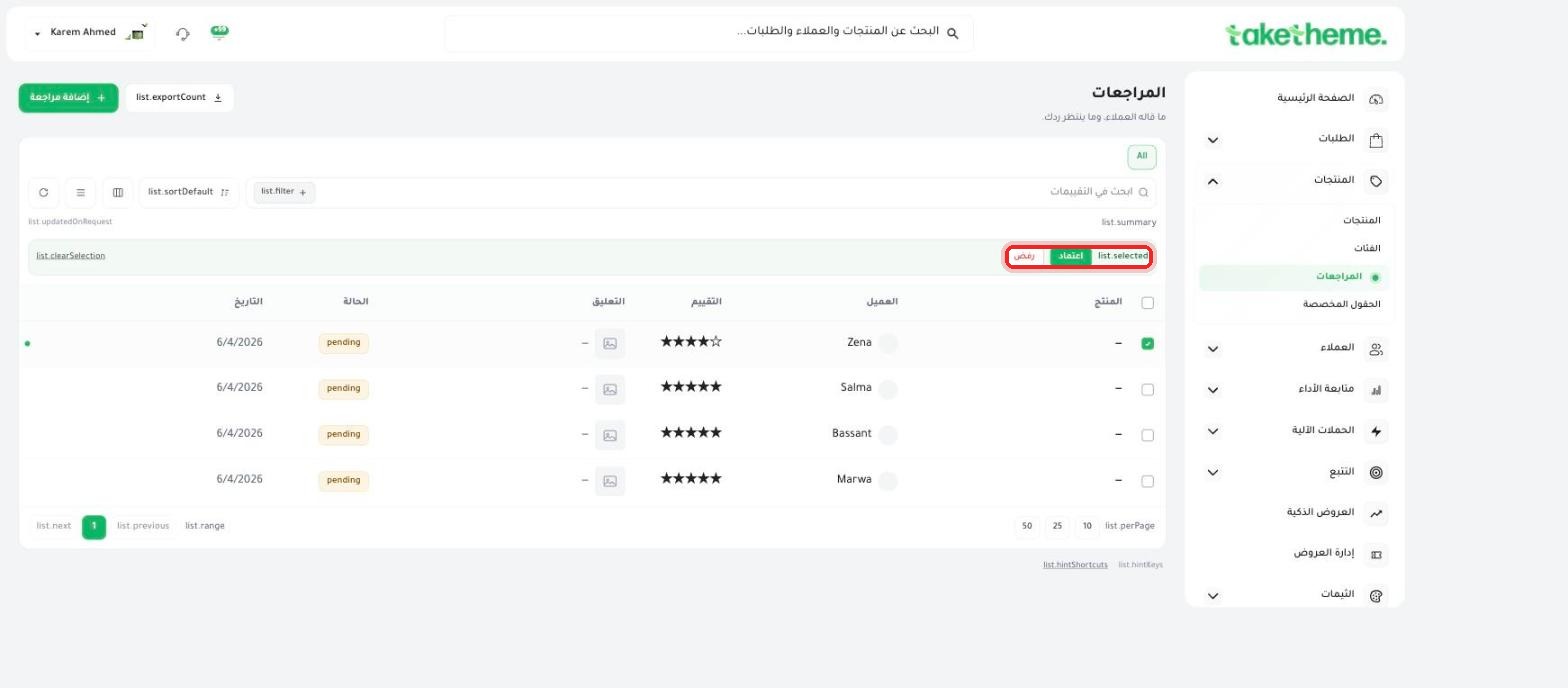
From the sidebar, go to Products → Reviews to view every review customers have written, with its current status (pending), date, and star rating.
2
Open any review to see its full details: the star rating, customer name, review text, and any images or video the customer attached.
3
From the Reviews page, select one or more reviews by checking the checkbox next to them — Approve and Reject buttons appear above the table.
📍 Approve and Reject buttons after selecting a review from the list
4
Click Approve to publish the review on the product page on the storefront, or Reject to hide it permanently if it was inappropriate or fake.
💡 All new reviews arrive with "pending" status and don't show to customers automatically — you have to approve them yourself first before they appear on the product page on the storefront.
❓ Frequently asked questions
Can I add a review manually myself?
Yes, from the "+ Add review" button at the top of the Reviews page you can write a review manually (useful if you received customer feedback another way, like WhatsApp or email).
Can I approve or reject more than one review at once?
Yes, you can select more than one row with the checkbox and apply approve or reject to everything selected at once.
Is a rejected review deleted permanently?
Rejected reviews disappear from the product page for the customer, but they remain in the reviews log in the dashboard for you to check back on later if needed.